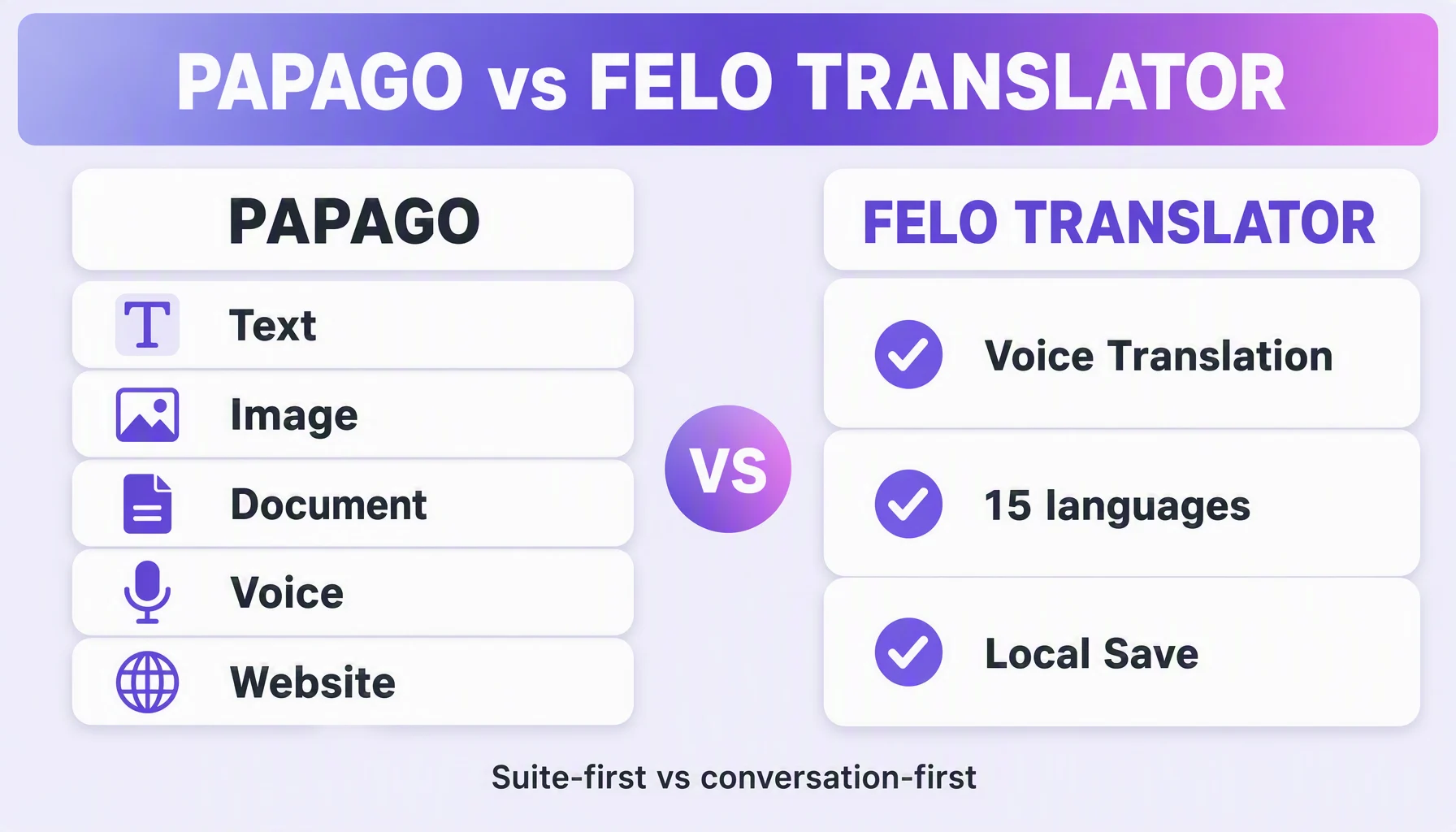
Papago — the translation app from NAVER — and Felo Translator both translate speech, but in different shapes. Papago is a multi-mode translator: text, image, document, voice, and website. Felo Translator is a real-time voice translation app: 15 languages, GPT-based, built around the spoken conversation. One-line verdict: Papago, when the thing you translate is a bill, a menu, or a page; Felo Translator, when the thing you translate is the person in front of you.
Papago and Felo at a glance
Dimension | Felo Translator | Papago |
|---|---|---|
Core product | Real-time voice translation app | Multi-mode translator (text / image / document / voice / website) |
Feature focus | Voice Translation, Translation Reading, Local Save — all conversation-shaped | Broad translation modes plus dictionary services (PAPAGO and Dictionary) |
Languages | 15, documented at felo.me/translator (Korean, Japanese, German, English, Simplified Chinese, Czech, Thai, Spanish, French, Taiwanese Mandarin, Italian, Russian, Cantonese, Indonesian, Vietnamese) | Broad multilingual coverage |
Read-back | Translation Reading — natural prosody | Voice translation is one of its modes; read-back of conversations is not its headline feature |
What is saved | Local Save: conversations stored on your device | Not covered in this comparison; check the app notes |
Pricing | Free to try; Pro (unlimited real-time voice translation) plus 1-day and 120-minute packs (felo.me/pricing) | Free tier plus a paid tier (features marked "Plus-only") |
Platforms | iOS + Android (app stores) | Web app plus mobile apps; its full modes run in the browser |
Read the table as two jobs, not two candidates. Papago is a translator's toolkit — many modes for the static text a day hands you. Felo Translator is one pipeline for one thing that happens in real time: a conversation.
- Choose Papago when translation is a scattered thing you do all day: a bill, an image, a long document, a website. Its East Asia coverage runs deep.
- Choose Felo Translator when the conversation is the task: you and another person at a market, in a taxi, at a clinic.
- Both on a foreign trip? Also normal: a multi-mode translator for menus and documents, a voice app for talking to people.
Why the conversation shape matters
Two people having a conversation are not a text pipeline. They need a voice translator with a rhythm — something that listens while someone speaks, translates it, and speaks the answer in a way the other person can hear. That is the Felo Translator shape: "hear or read your translations" — via Voice Translation and Translation Reading. It is smaller on purpose: 15 languages, one conversation at a time.
How to decide
- Name the job. A receipt, a menu, a PDF, a web page — Papago territory. Two people talking — Felo territory. Most market days have one kind of work, and that one decides the app.
- Check your pair against the 15 (the list is in the table). Both sides in it means the voice pipeline is the tested route; one side missing? Felo is not the tool for that pair.
- Ask who has to read the answer. Both apps show text on screen — Felo speaks the same line while showing it.
- Ask who has to hear the answer. A conversation is listening turns, not reading turns. Translation Reading reads the translation with natural prosody; Papago's voice mode is built for single shots, not a back-and-forth rhythm.
- Ask what you keep. Felo's Local Save stores the conversation on your device, so the number you confirmed is checkable an hour later. No record needs? This dimension is a tie.
- Check the price. Felo is free to try; Pro covers unlimited real-time voice translation, with 1-day and 120-minute packs (felo.me/pricing). Papago has a free tier plus a paid tier with "Plus-only" features. The job picks the app; the price picks the plan.
Tips
- Install both before a trip. The image job and the talking job are two jobs.
- Shoot the menu, don't type it. Papago's image mode translates a photo of the text in place.
- In a spoken conversation, say one thing at a time. Two short sentences is the comfortable limit; a paragraph on the spot is the failure mode.
- Turn the screen toward the other person — they confirm with a point, not a repeat.
- Leave Local Save on. The conversation on your device is the record: price, address, pickup point.
Watch out for
- The 15 is the full list. A pair outside it needs a general translator; no mode in this app changes that.
- Papago's voice is a mode, not a conversation feature. Conversation read-back with rhythm is not what it leads with.
- Papago's exact language count was not verified for this comparison. Its catalog is advertised as broad — check its listing where your pair sits outside the 15.
- The verdict is job-shaped, not brand-shaped — a menu morning and a market afternoon is two apps.
FAQ
Which has more languages, Papago or Felo? Felo's is 15 — the list is in the table above; Papago advertises broad multilingual coverage. For pairs inside the 15, Felo's voice pipeline is the tested route.
Is Papago free? Papago has a free tier plus a paid tier with features labeled "Plus-only." Felo is free to try, with Pro covering unlimited real-time voice translation (felo.me/pricing).
Do both do voice translation? Yes. Papago lists voice among its modes; Felo Translator lists Voice Translation as a named feature — instant AI transcription and multilingual translation you can hear or read.
Can the other person read the translation? With Felo, yes — "hear or read your translations" is Felo Translator's own description of its output. Papago's interface equally serves screen-based use in its voice mode.
By the Felo Editorial Team. The Felo Editorial Team writes about language, voice translation, and the details of talking across borders.